
Windows 11 January 2026 Update is rolling out for Windows 11 25H2, 24H2, and 23H2, as well as Windows Server 2025 and 2023, and some other editions/versions. This month’s security update does not have a lot of new features for consumers or Windows Server (enterprise), but there are several notable security fixes.
I made a table that summarizes all the January 2026 Patch Tuesday:
| Windows version | OS build(s) | Release date |
|---|---|---|
| Windows Server 2025 (KB5073379) | Build 26100.32230 | January 13, 2025 |
| Windows Server 2023 (KB5073450) | Build 25398.2092 | January 13, 2026 |
| Windows 11 25H2 (KB5074109) | Builds 26200.7623 (25H2) and 26100.7623 (24H2 | January 13, 2026 |
| Windows 11 23H2 (KB5073455) | Build 22631.6491 | January 13, 2026 |
| Windows 10 ESU (KB5073724) | Builds 19045.6809 and 19044.6809 | January 13, 2026 |
January 2026 Patch Tuesday for Windows has up to 114 security fixes and up to three zero-day vulnerabilities.
| Security issue / CVE | Vulnerability type | Count or status | What happens when your PC is affected? |
|---|---|---|---|
| All security flaws fixed this month | Mixed | 114 vulnerabilities | Total number of Windows security bugs fixed in the January 2026 Patch Tuesday updates. |
| Critical vulnerabilities | Remote Code Execution, Elevation of Privilege | 8 critical (6 RCE, 2 EoP) | Highest-risk bugs that can lead to full system compromise. |
| Elevation of Privilege bugs | Elevation of Privilege (EoP) | 57 vulnerabilities | Allows attackers to use their user account with admin privileges. |
| Security Feature Bypass bugs | Security Feature Bypass | 3 vulnerabilities | Allows attackers to skip Windows security checks, including Secure Boot protections. |
| Remote Code Execution bugs | Remote Code Execution (RCE) | 22 vulnerabilities | When exploited, attackers run their own code on a Windows PC wirelessly. |
| Information Disclosure bugs | Information Disclosure | 22 vulnerabilities | This exposes sensitive data to the attacker. |
| Denial of Service bugs | Denial of Service (DoS) | 2 vulnerabilities | If exploited, it can crash Windows. |
| Spoofing bugs | Spoofing | 5 vulnerabilities | This allowed attackers to pretend to be a trusted user or service in Windows. |
| CVE-2026-20805 (Desktop Window Manager) | Information Disclosure zero-day | Actively exploited | Leaked memory addresses from a remote ALPC port. |
| CVE-2026-21265 (Secure Boot certificates 2011) | Security Feature Bypass zero-day | Publicly disclosed | Expiring Secure Boot certificates could allow Secure Boot bypass on systems that are not updated. |
| CVE-2023-31096 (Agere Soft Modem driver) | Elevation of Privilege zero-day | Publicly disclosed, previously exploited | Abused the agrsm64.sys, agrsm.sys modem drivers to gain admin rights. The drivers are now removed. |
How to download Windows 11 January 2026 Patch Tuesday updates?
To download and install the Windows 11 January Patch Tuesday, you need to open Settings > Windows Update and check for updates.
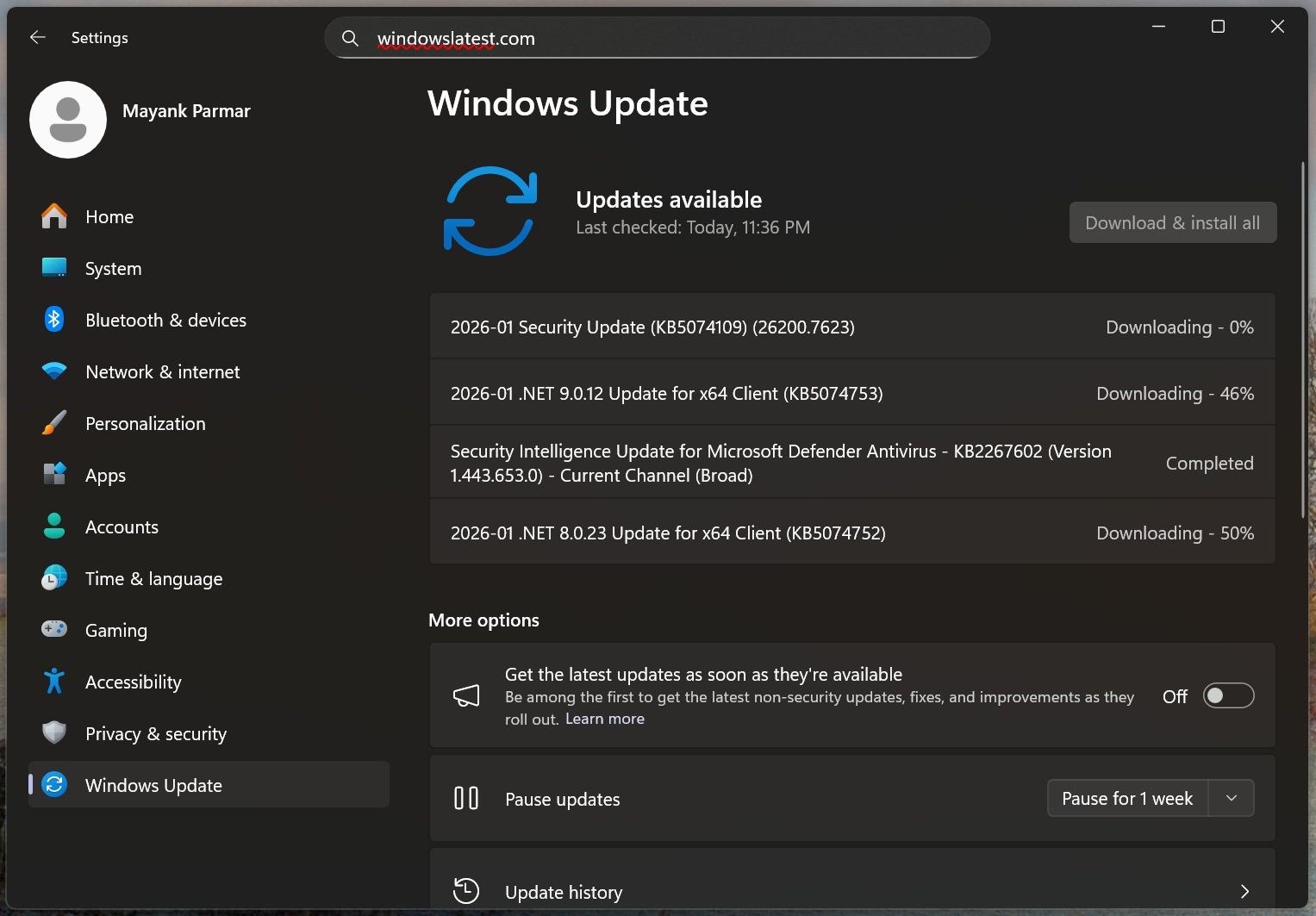
If the updates do not install via Windows Update, we recommend using Microsoft Update Catalog and then typing the KB (knowledge base number) in the search box. If you enter the right one, you can find the offline installers for all Windows January 2026 Updates I listed above, including KB5073379 for Windows Server 2025.
Windows Server 2025 KB5073379 and Windows Server 2023 KB5073450
With the January 2026 Patch Tuesday (KB5073379), Windows Server 2025 is moving to a new KB identifier, which means the KB number no longer matches that of Windows 11 consumer edition (25H2 or 24H2). The Windows Server 2025 build number is also going to be unique, not the same as the Windows 11 25H2 client.
“This change improves clarity for administrators,” Microsoft noted in a support document. “Installation and management processes remain the same.”
I installed Windows Server 2025 KB5073379 and bumped the OS to Build 26100.32230, but I couldn’t spot any visible changes. And that makes sense. You’re not going to come across new features because Microsoft engineers have been away from work.
Microsoft also says it’s not aware of major issues, but there are some notable changes. First and foremost, Microsoft has removed older drivers for Motorola modems used in older PCs or laptops. This includes grsm64.sys, agrsm.sys, and smserial.sys, but Windows Latest understands that 99.99% of users won’t notice any difference.
Moreover, another bug has been patched where some Windows Server installations were not being offered Hotpatch updates after installing KB5070881, which was an out-of-band update.
Here’s the full list of changes in Windows Server KB5073379 (Build 26100.32230):
- Microsoft is replacing older Secure Boot certificates with new certificates, so your hardware is able to validate a legitimate boot loader.
- Microsoft is updating the WinSqlite3.dll component with security fixes. This component is used within Windows apps, including third-party apps.
On the other hand, Windows Server 2023 is getting KB5073450 with the January 2026 Patch, and it bumps the OS to Build 25398.2092. And for those with Windows Server 2022, you will get KB5073457 with Build 20348.4648. The release notes for Windows Server 2023 and 2022 are above.
Windows 11 Build 26200.7623 (25H2) and Build 26100.7623 (24H2) in January 2026 Patch Tuesday
This month, Microsoft is rolling out the Windows 11 KB5074109 for 25H2 and 24H2. If you’re on 25H2, it bumps the OS to Build 26200.7623. On the other hand, version 24H2 bumps to Build 26100.7623.
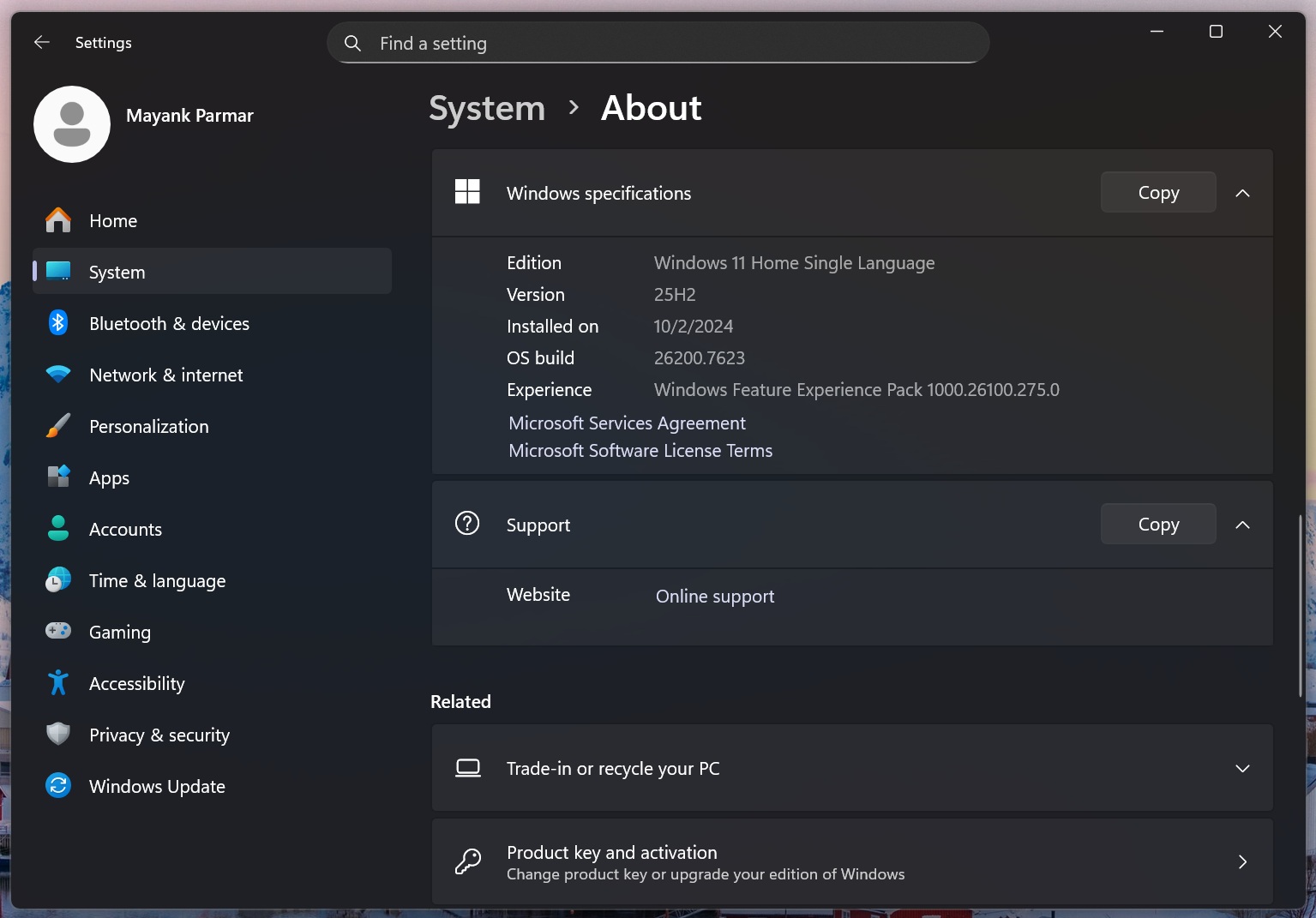
I’ve been using the update for two days now, and so far, I have not run into any problems. As for the new features, the January 2026 Patch Tuesday is not a big release, but as I highlighted in our review, more people will begin seeing some of the new stuff, such as the new Start menu with categories layout, Share with Copilot on the taskbar, and more.
New Advanced Settings
For example, after the Windows 11 January 2026 Update, if you go to Settings > System, you will find a new ‘Advanced Settings‘ page, which was previously called ‘For Developers,’ and it allows you to turn on advanced features for File Explorer, such as linking GitHub, so you can view who committed the file and its branch directly from Explorer.
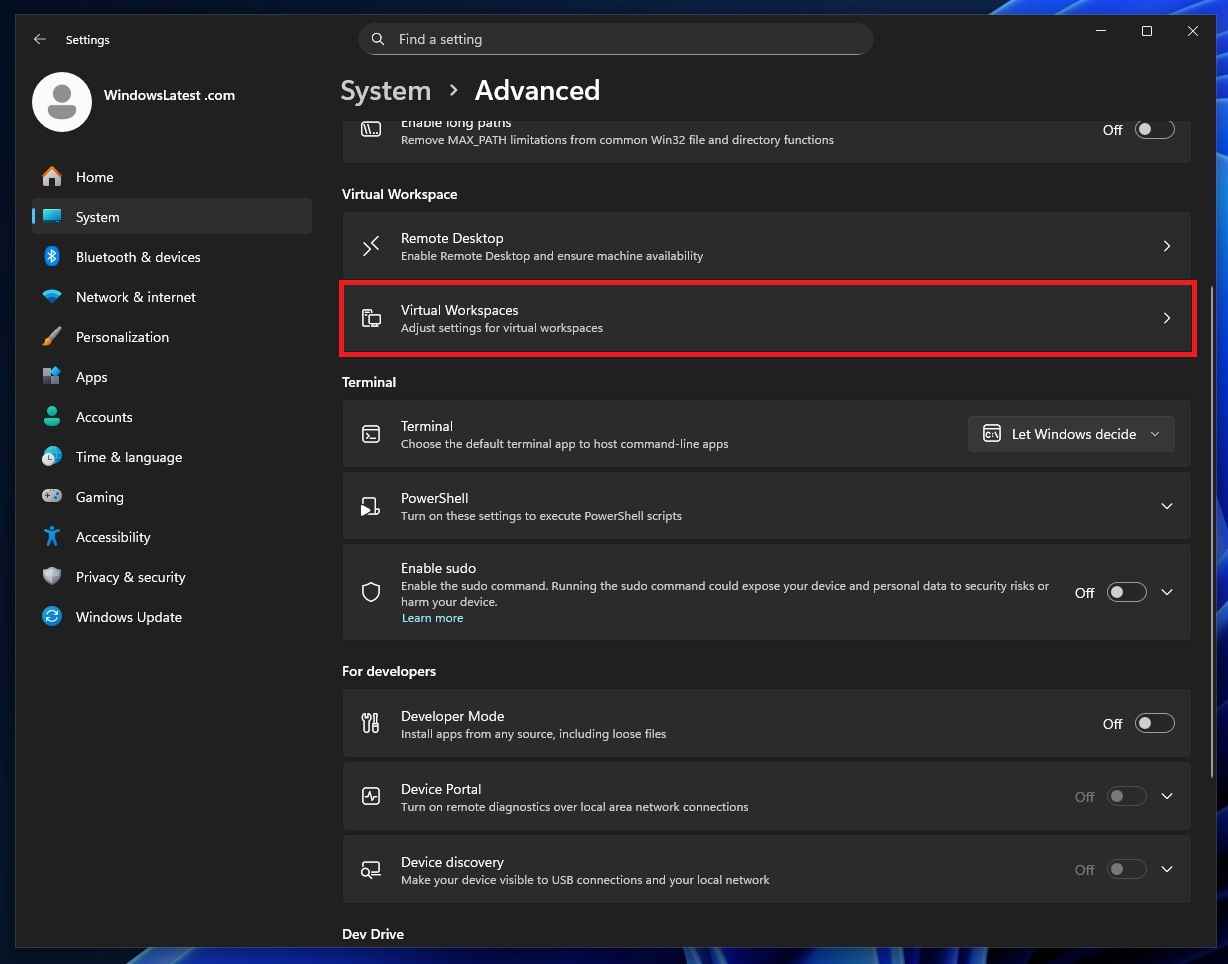
You can now also turn on Hyper-V features, including Windows Sandbox, from Advanced Settings.
New Start menu rolls out
Finally, the new Start menu is now available for more users (not everybody), and it adds a single-page UI. It makes the Categories view the default layout for the All apps list. You can switch back to the original grid layout, but the catch is that the Start menu is taller than the original Start.
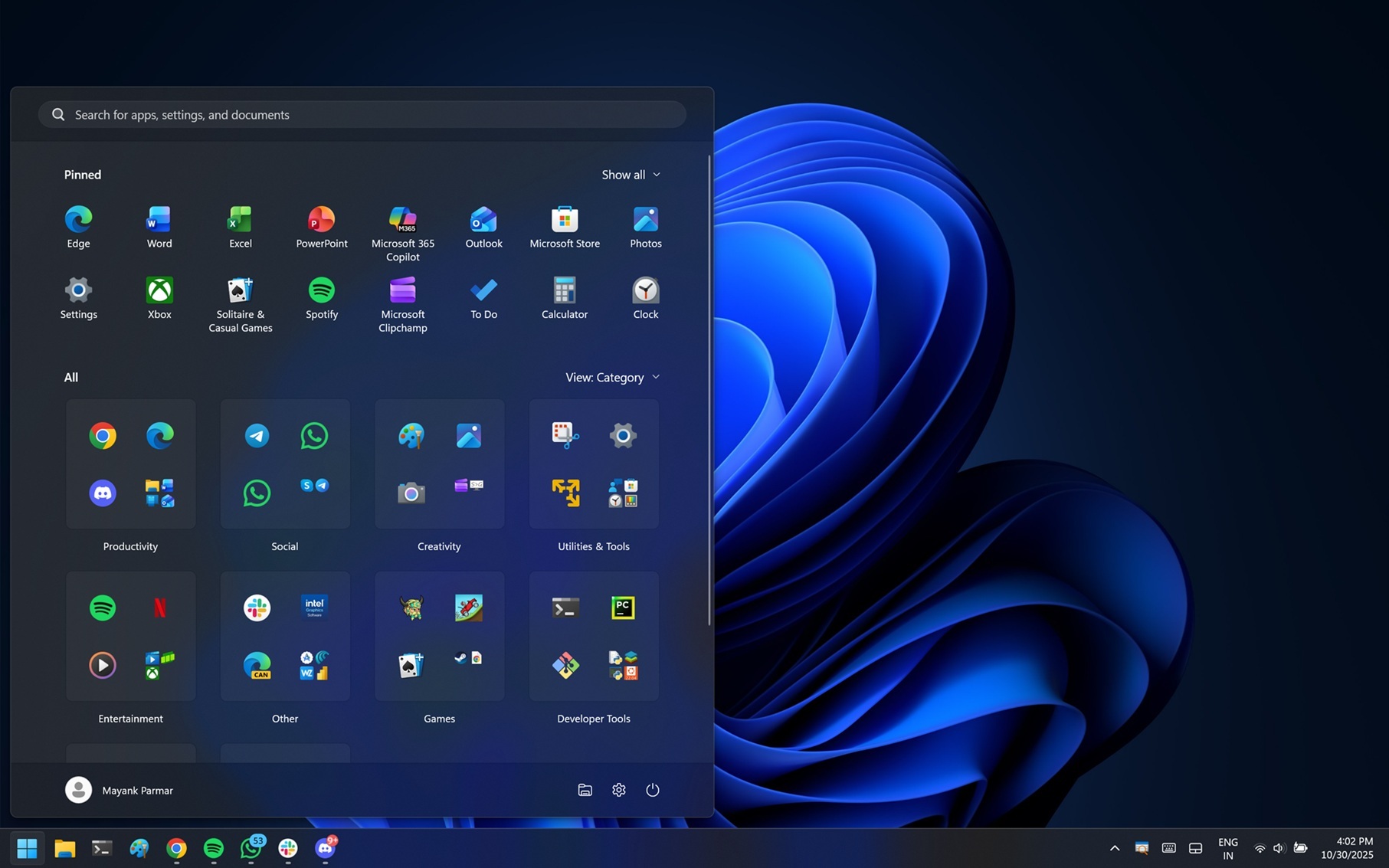
This means it can use more screen space depending on your screen resolution and scaling settings.
Here’s a list of all other changes in the Windows 11 January 2025 Patch Tuesday update, rolling out:
- File Explorer’s dark mode has expanded to operation dialogs, including file transfer, and when a confirmation dialog shows up when you try to delete a folder that requires approval (admin). We’re also seeing dark mode in all dialogs inside File Explorer, including ‘Skip’ and ‘override.’ But the dark mode for the Properties tab is missing.
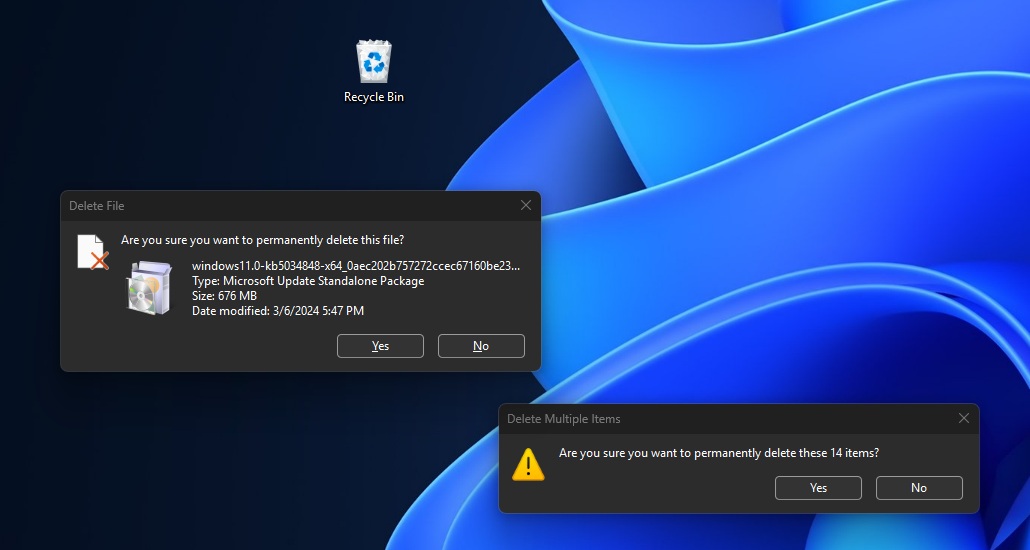
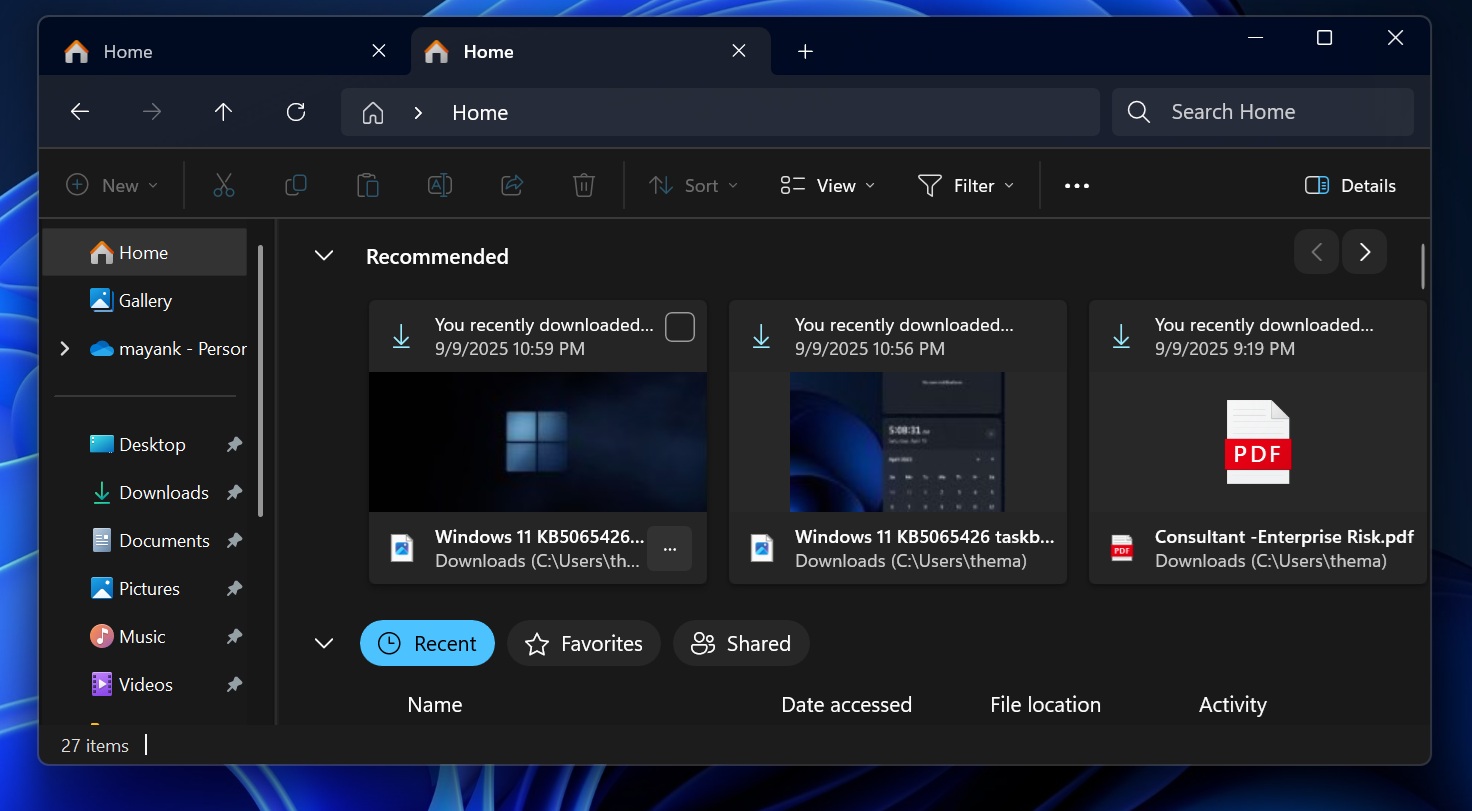
Image Courtesy: WindowsLatest.com - You can now turn on a new Recommended section in File Explorer from the Options menu in File Explorer.
- Microsoft is turning on Full Screen Experience for handhelds. Previously, the FSE was locked to ROG Ally and ROG Ally X, but now it works on handhelds like Legion Go 2 and reduces resource usage for background activities.
- Stylus/pens now have haptic feedback, similar to the haptic trackpad.
- Keyboard backlight performance has been improved.
- You can now manage your connected phones in Settings > Bluetooth & Devices > Mobile Devices.
- If you select a file in File Explorer or the desktop and drag it to the top region of the screen, you will notice a drag tray, and it’s now getting updated with support for multi-file sharing, along with more relevant apps.

Windows 11 KB5073455 (23H2) with Build 22631.6491
Windows 11 KB5073455 is available for enterprise PCs running version 23H2, as support for consumer editions ended in November 2025.
The list of changes is more or less similar to Windows Server release notes, which means Microsoft has removed select old modem drivers, fixed an issue affecting Remote Desktop Protocol (RDP) connections, and addressed a bug where apps like Outlook, Teams, or Excel crash when you type text.
Windows 10 Build 19045.6809 under ESU (Extended Security Updates)
There’s also an update for Windows 10 PCs, and that is Build 19045.6809 (KB5073724), but it requires you to sign up for ESU (Extended Security Updates).
If you don’t see the update on Windows 10, make sure you’ve signed up for ESU from the Windows Update page:
As for the fixes in the January 2026 Patch Tuesday for Windows 10, it’s the same as the release notes I shared above for Windows Server. This means that older drivers used for the modem have been removed, and Microsoft is including new Windows Secure Boot certificates.
Last but not least, a core Windows component called ‘WinSqlite3.dll’ has been updated with better security.
What are the known issues in the January 2026 Update?
Microsoft says it identified one known issue in Windows 11 January 2026 Update (and Windows 10), where Remote Desktop connections could fail. This happens when you use the Windows app (previously Remote Desktop), but it only affects Azure Virtual Desktop and Windows 365.
If you’re affected, you might not be able to sign in and access the desktop using the Remote Desktop feature.
Microsoft is working on a solution and it’ll share more details soon.
The post Windows 11 January 2026 Update: Mostly fixes for consumers, as Windows Server KB5073379, KB5073450 ships for enterprises appeared first on Windows Latest
Leave a Comment
No comments yet. Be the first to comment!