
Windows 10 KB5073724 is available, but it shows up only when you subscribe to ESU (Extended Security Updates). With ESU for Windows 10, you can continue to receive security updates until October 2026, but remember that there’ll be no major noticeable changes, as Windows 10 official support has already ended.
Today’s update is called “2026-01 Cumulative Update for Windows 10 Version 22H2 for x64-based Systems (KB5073724).” I installed it on my PC running Windows 10 ESU, and it bumped the OS to Build 19045.6809.
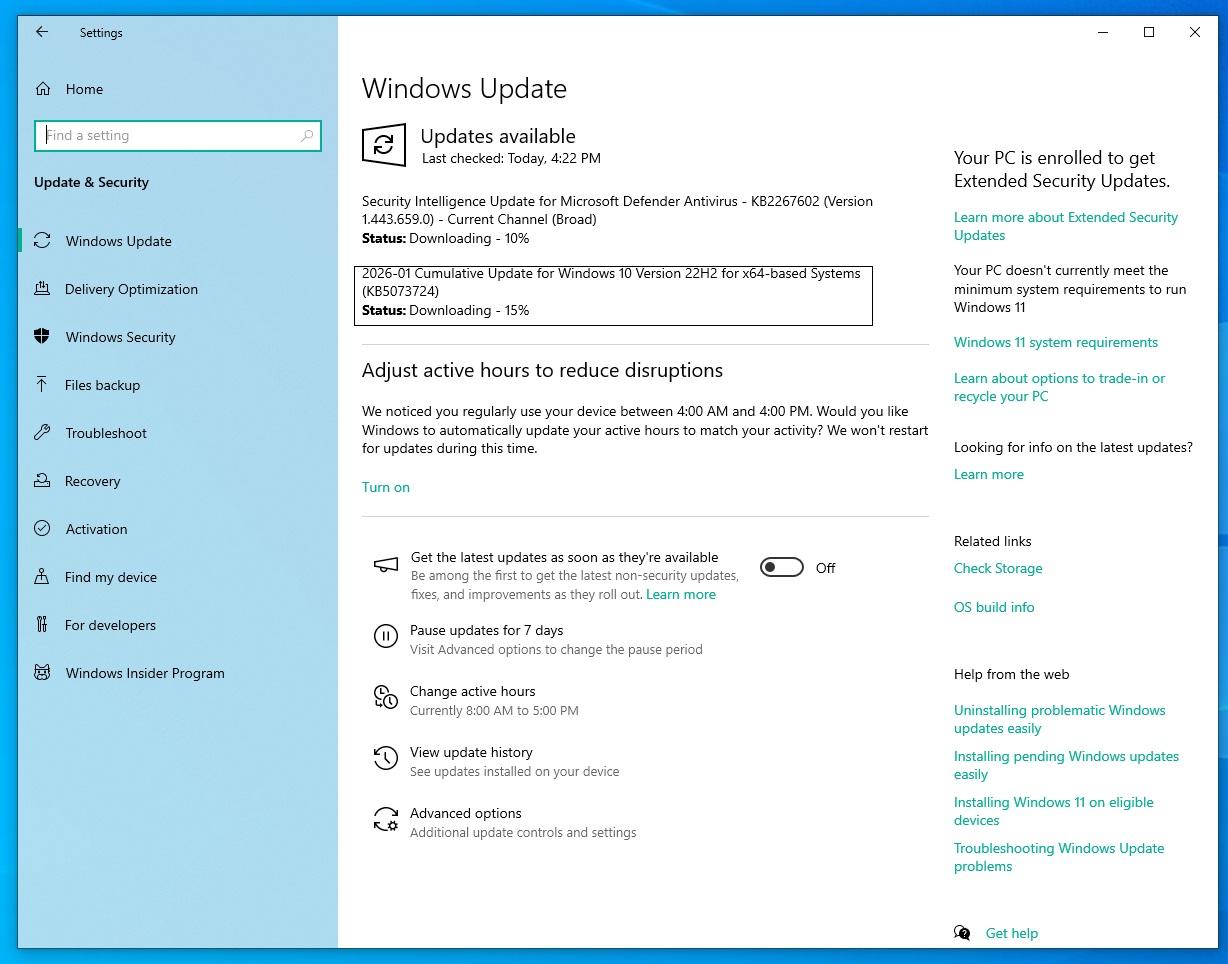
You can download and install it from Settings > Updates & Security > Windows Update or use the Update Catalog if you prefer offline installers in .msu.
Download Links for Windows 10 KB5073724
Windows 10 KB5073724 Direct Download Links: 64-bit and ARM-64 | These installers may not work if you haven’t signed up for ESU.
What’s new in Windows 10 Build 19045.6809
As per the official release notes, Microsoft confirmed that it removed some specific modem drivers required for internet connection on older PCs.
It doesn’t look like it’s going to affect most users (99.99% should be unaffected). As per Microsoft, Windows 10 no longer comes with the following drivers required for modem hardware:
- agrsm64.sys (x64)
- agrsm.sys (x86)
- smserl64.sys (x64
- smserial.sys (x86)
Microsoft warns that modem devices that rely on these drivers may not work anymore after installing Windows 10 KB5073724. I tried using the modem on a couple of my older PCs after installing the Patch Tuesday update, but I did not run into any issues. The modem was still being detected.
In our research, Windows Latest found that these drivers are linked to two different families of old modems. The first driver is.sys (x86) or agrsm64.sys (x64) is for Agere (formerly Lucent) and LSI Modem chipsets, which were found in older laptops or desktops.
The second driver is smserial.sys (x86) or smserl64.sys (x64), which were developed by Motoroa under the SM56-era class.
These drivers have been removed from Windows 10, and modems that still rely on them won’t work anymore.
Microsoft rolls out fresh Secure Boot certificates
The January 2026 update for Windows 10 includes new Secure Boot certificates, as the older certificates had recently expired.
What are Secure Boot certificates?
If they are not replaced, Secure Boot may stop trusting new boot components, and this makes your PC vulnerable.
On Windows 10, including Enterprise LTSC and ESU systems, new Secure Boot certificates are included. This change is specifically important for enterprises, as consumers do not have to deal with Secure Boot certificates when Windows Update is turned on
WinSqlite3 updated with better security
Last but not least, Microsoft says it has updated a core component called WinSqlite3.dll with security fixes. This change is being rolled out after some users found that their antivirus solutions flagged the apps with WinSqlite3.dll as vulnerable.
If you still run into security alerts, Microsoft recommends updating all apps from the Store.
Third-party apps use sqlite3.dll, and if this particular file is being flagged as vulnerable, you need to reach out to the developer of the app. Or if a Microsoft-owned app is being flagged with sqlite3.dll as vulnerable, you need to open the Windows Store and install all updates.
Are there any known issues in Windows 10 KB5073724
Microsoft says it’s not aware of any new issues in Windows 10’s January 2026 Patch Tuesday, and I don’t think you’ll run into problems. That’s because Windows 10 is in the Extended Security Updates phase, and Microsoft is only adding new features to Windows 11 25H2 or newer.
If you are still on Windows 10, you should immediately install KB5073724, as it’s a part of Patch Tuesday and includes dozens of important fixes, including up to three zero-day vulnerabilities.
This month’s update for Windows patches at least 112 security issues, including 57 Elevation of Privilege vulnerabilities, 22 Information Disclosure vulnerabilities, and 5 Spoofing vulnerabilities.
| Vulnerability type | Count | Notes |
|---|---|---|
| Elevation of Privilege | 57 | Lets attackers try to gain higher rights on the system |
| Security Feature Bypass | 3 | Includes Secure Boot certificate issue (CVE-2026-21265) |
| Remote Code Execution | 22 | 6 of these are rated Critical |
| Information Disclosure | 22 | Includes Desktop Window Manager zero-day (CVE-2026-20805) |
| Denial of Service | 2 | Can be used to make services or apps stop working |
| Spoofing | 5 | Used to pretend to be a trusted user or system |
| Total fixed this month | 114 | 3 zero-days (1 exploited) and removal of Agere modem driver flaw (CVE-2023-31096) |
In a security bulletin, Microsoft noted that it fixed an issue where the Desktop Window Manager could be exploited to allow an unauthorized actor to access information locally, and even allowed bad actors to read memory addresses. This issue abused a remote ALPC port.
The post Windows 10 KB5073724 is January 2026’s Extended Security Update (ESU) and it removes old modem drivers appeared first on Windows Latest
Leave a Comment
No comments yet. Be the first to comment!